Black Friday is one of the most important sales events of the year for many e-commerce businesses. For a few days, website traffic, advertising campaigns, product searches, and, of course, purchases all increase. But Are you sure Google Analytics 4 is correctly collecting all that information?
Imagine you invest in Google Ads, manage to increase sales, and then, when you review the results, discover that some of the purchases are attributed to the payment gateway or that cart events weren't being tracked.
An incorrect GA4 configuration can lead you to make decisions based on incomplete or incorrect data. And the worst part is that many of these errors cannot be corrected retroactively.
That's why, before Black Friday arrives, it's a good idea to take some time to review how your property is set up. In this guide, we go over the key settings you should check to accurately measure user behavior and campaign performance.
Check out GA4's improved measurement
Improved measurement allows for automatically log certain user interactions without having to configure each event individually.
Among them are:
- Page views: to find out which pages users visit.
- Scrolling: to determine when they reach approximately 90 % of a page.
- Outbound clicks: to track interactions with links that lead to other websites.
- Internal searches: to find out which products or terms users are searching for in your store.
- File downloads and interactions with videos and forms, when the measurement conditions are met.
To check this, go to Administrator > Data Flows, select your e-commerce website's web flow and verify that the enhanced measurement option is enabled.
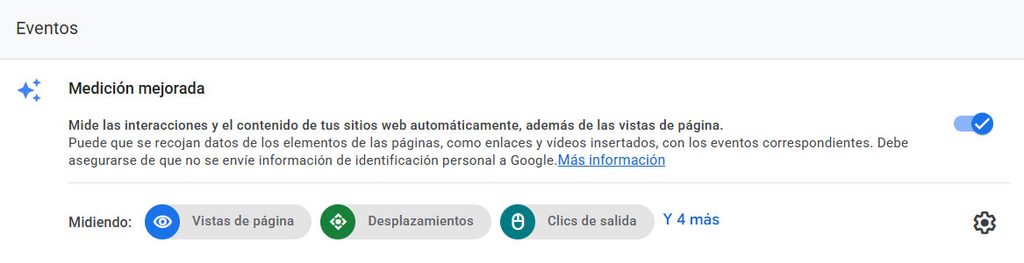
Pay special attention to internal searches. During Black Friday, they can help you identify which products generate the most interest and identify opportunities ways to improve your catalog.
Keep in mind, however, that enhanced measurement does not replace an e-commerce implementation. Events related to products, shopping carts, and purchases require specific configuration.
Prevent payment gateways from altering your data
One of the most common mistakes in e-commerce analytics is that payment gateways appear as traffic sources.
This pThis can happen when a user temporarily leaves your store to complete the payment and then return. If GA4 interprets that return as a new referral, the purchase attribution may be affected.
Why is it important during Black Friday? Because you might be attributing sales to a payment gateway instead of properly analyzing the performance of your Google Ads campaigns, email marketing, or organic traffic.
To check this, go to your data feed settings and look for the option List unwanted references, in the label settings.
From there, you can specify which domains should not be considered as reference sources.
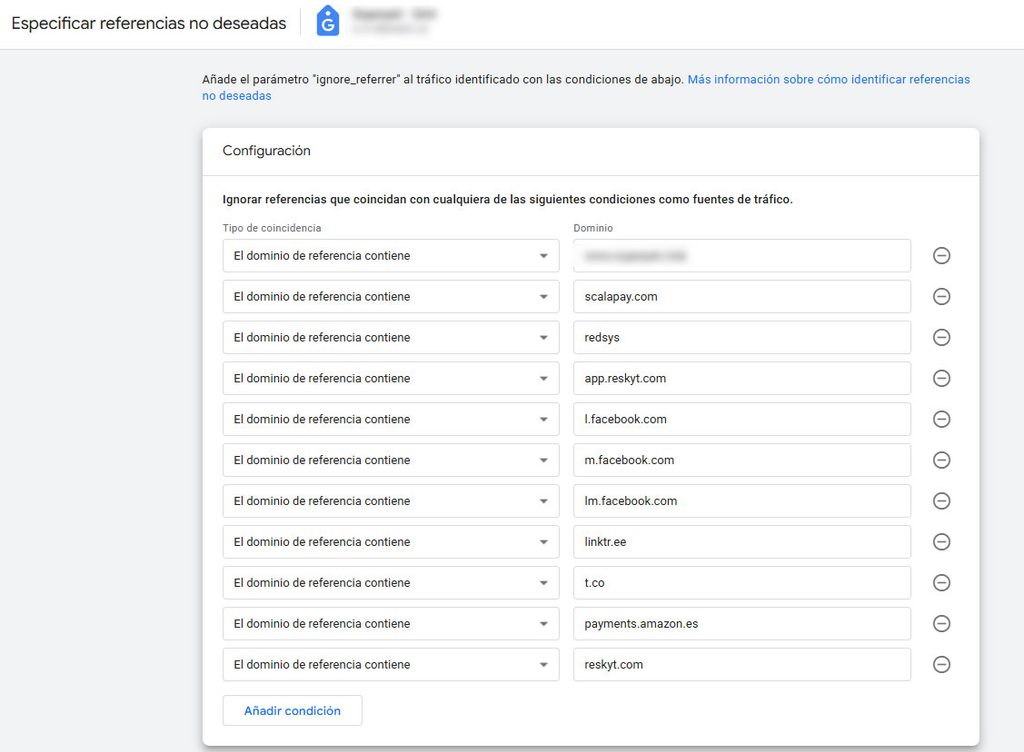
Before adding domains, review the traffic acquisition report to identify any potential referrals from paid services.
Keep in mind that excluding a reference alone does not solve all cross-domain tracking issues. If your checkout process uses multiple domains, you may also need to review your multi-domain tracking.
Check cookie consent
Consent settings are another aspect worth reviewing before launching a major campaign.
Since the introduction of Consent Mode v2, Google uses four signals related to consent:
- analytics_storage: storage related to Analytics.
- ad_storage: advertising-related storage.
- ad_user_data: consent to send user data to Google for advertising purposes.
- ad_personalization: Consent to use data for personalized advertising.
These settings affect how data is collected and used, as well as certain advertising features.
If you use Google Ads to promote your Black Friday deals, Incorrect implementation of consent may limit the creation and use of remarketing audiences.
How can you check this? Use tools like Google Tag Assistant to verify which signals are sent when a user accepts or rejects cookies.
It's not enough to just have a cookie banner installed. It's important Check that it is properly connected using measuring instruments and that respects the user's preferences.
Configure data retention
Did you know that, by default, GA4 can only retain event data used in explorations for two months?
This can become a limitation if you want to analyze user behavior during different campaigns or compare extended periods.
To review it, go to:
Administrator > Data Collection and Modification > Data Retention.
In a standard GA4 property, you can extend the retention period for event data up to 14 months.
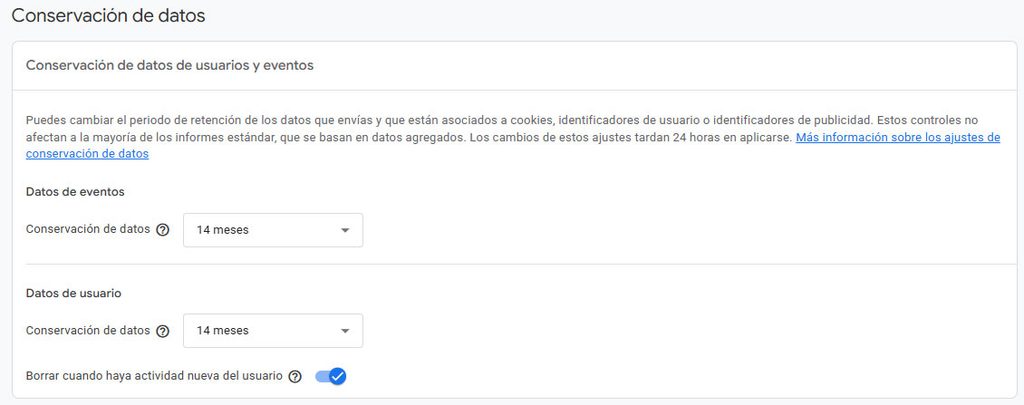
This change primarily affects reports and does not mean that standard reports will disappear after two months.
Extending the retention period will allow you to perform certain more comprehensive analyses, although you should keep in mind that this change does not recover information that has already been deleted.
Check the e-commerce events
We've reached one of the most important sections of this guide.
To properly analyze the performance of an e-commerce site, It's not enough to know how many people visit the website or how many purchases are made. We also need to understand what happens between those two moments.
Google Analytics 4 provides recommended events for tracking the different stages of the purchase process.
| Event | What it records |
| view_item | Product View |
| add_to_cart | Product added to cart |
| view_cart | View Cart |
| begin_checkout | Start of the payment process |
| add_shipping_info | Shipping Information |
| add_payment_info | Payment Information |
| purchase | Purchase Complete |
These events allow us to analyze the user journey and identify the stages at which the majority of drop-offs occur.
For example, if during Black Friday many users add products to their carts but few actually proceed to checkout, that’s a sign that it’s worth reviewing that part of the purchasing process.
How do I check the events?
In GA4, you can view the events received in the property's events section.
However, Just because an event appears in the list doesn't necessarily mean it's configured correctly.
It is also important to verify that e-commerce events correctly send the relevant parameters, such as the product ID, price, currency, and order total.
In the case of a purchase, it is especially important to check the transaction ID (transaction_id) to avoid certain duplicate records.
For a more detailed check, you can use DebugView or the Google Tag Manager debugging tools.
If you detect missing events, incorrect values, or duplicate purchases, you'll need to review the technical implementation before launching the campaigns.
Check which events are marked as key
In Google Analytics 4, key events represent the actions that are especially important for your business.
In e-commerce, a purchase is usually the main key event, although there may also be other relevant actions depending on the measurement objectives.
It is worth making a distinction here: Not all e-commerce events need to be marked as key events.
For example, `view_item` and `add_to_cart` can be tracked and used in reports without having to mark them as such.
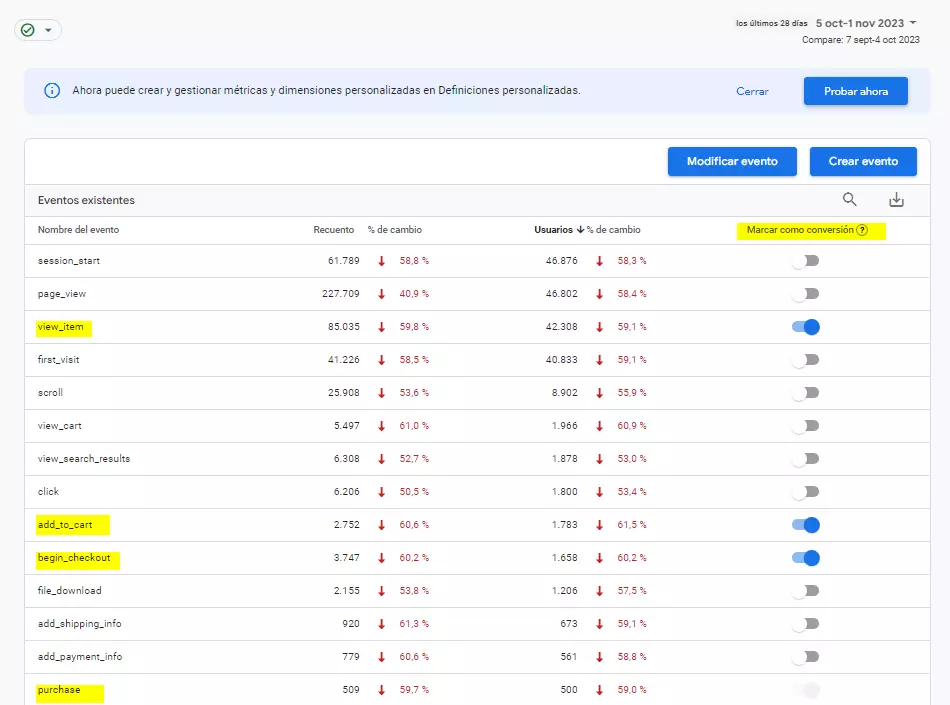
In addition, if you import events into Google Ads as conversions, you should review how they are used to prevent campaigns from optimizing for actions that do not align with your primary business objective.
You can check these settings in the "Events" and "Key Events" sections of GA4.
We recommend reviewing which actions are truly valuable to your business and ensuring that your settings are consistent across Analytics and Google Ads.
Exclude your company's internal traffic
In the weeks leading up to Black Friday, it's common for the marketing, design, and development teams to be constantly coming in to the store.
Banners are reviewed, discounts are verified, test purchases are made, and product pages are visited.
If all of these interactions are recorded as actual visits, may alter user behavior data.
GA4 allows you to identify internal traffic using rules that you can configure in the data flow.
You can then manage their removal from Administrator > Data Filters.
It is important to test these filters before enabling them permanently, since data excluded by an active filter cannot be recovered later.
It is also a good idea to Keep in mind that rules based on IP addresses may not be sufficient when the team works from different locations or uses varying connections.
Prepare your audiences for your campaigns
One of the benefits of having GA4 set up correctly is the ability to create audiences based on user behavior.
These audiences can be used to analyze visitor groups and, when the relevant requirements are met, leveraged in advertising campaigns.
With Black Friday approaching, some of the most interesting ones are:
- Users who have added products to their cart without completing the purchase.
- Users who have already made a purchase, to analyze their behavior or develop loyalty campaigns.
- Returning users, who are already familiar with your store.
- Users who have used the internal search engine, especially if they're looking for specific categories or products.
For example, you can identify users who showed interest in a product but didn't end up buying it, and consider remarketing strategies.
Keep in mind that audiences need time to build up a user base and that their ad availability depends, among other factors, on consent and Google Ads requirements.
That is why, It's not a good idea to wait until Black Friday itself to start creating them.
These segmentations can also serve as a starting point for designing strategies to marketing automation, although email-based shopping cart recovery efforts require having the appropriate data and consent on file in the relevant tools.
Verify the identity for the reports
The report ID determines How GA4 Identifies Users Based on Available Signals.
Depending on your property's layout, you may find different identification methods, such as ethe one based on observed data, the one based on the device, or the one that incorporates modeling when the requirements are met.
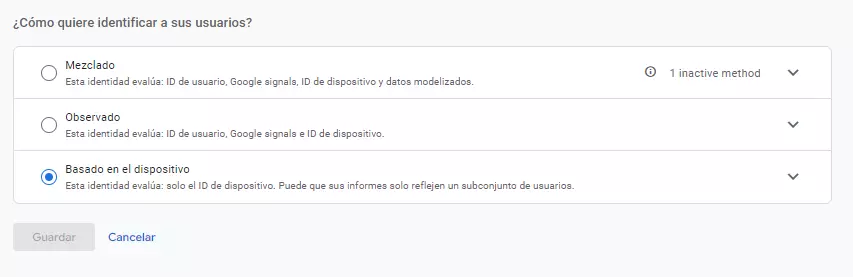
This choice may affect the user numbers that appear in certain reports.
You can check the setting from Administrator > Identity for Reports.
There isn't a specific setting you need to change automatically just because Black Friday is coming. The important thing is to know which method your property uses and to maintain consistent criteria when analyzing the results.
If you notice significant differences between reports, you should review this section along with the rest of the measurement settings.
Check for integrations with other Google tools
Finally, make sure Google Analytics 4 is properly linked to the tools you use to manage and analyze your campaigns.
The main ones are:
- Google Ads: to share audiences and use the conversions configured according to your measurement strategy.
- Google Search Console: to view information about organic search performance in Analytics.
- Google Merchant Center: to link business information when the integration requirements are met.
- BigQuery: to work with exported event data and perform more advanced analyses.
You can find these options at Administrator > Product Links.
If you're going to invest in Google Ads campaigns During Black Friday, be sure to check that the tracking is active and that the conversion actions used by your campaigns are correct.
Is your GA4 ready for Black Friday?
Just because you have Google Analytics 4 installed doesn't necessarily mean you're accurately tracking what's happening on your e-commerce site.
Before launching your promotions, take the time to review purchase events, traffic sources, consent, audiences, and connections to your advertising platforms.
The goal is not to collect as much data as possible, but rather to have reliable information that helps us understand which campaigns are effective and where there are opportunities for improvement.
And while these adjustments are a good starting point, every e-commerce site has its own unique characteristics that require specific configuration and analysis.
At Geotelecom, we offer a web analytics which we use to review your business metrics, identify configuration errors, and help you make decisions based on reliable data.
Do you want to make sure your e-commerce site accurately tracks Black Friday sales? We can help you review your GA4 settings before the campaign begins.