Uploading a video to YouTube and hoping it will find an audience on its own isn't usually a very effective strategy. The platform receives a huge amount of content, and—just like Google—it has to decide which videos to show when someone performs a search.
That's why, yes, We can talk about SEO on YouTube. Although it has its own unique characteristics.
YouTube explains that its search system primarily takes three factors into account: relevance, interaction, and quality. Analyze whether the title, description, tags, and the video's content itself match the search query, but also observe what happens after the click: whether people actually watch that content and whether it seems to satisfy what they were looking for.
This significantly changes the way you approach strategy. It's not enough to just find a keyword and repeat it several times. The goal is to get YouTube to understand what we're talking about, that the user wants to watch it and, above all, that they find what they were expecting to find in the video.
How Does SEO Work on YouTube?
Let's think of someone who is looking for “How to Conduct an SEO Audit”.
YouTube needs identify which videos might address that intent. To do this, it links the search query to various signals from the video, including its title, description, tags, and content. Then, signals derived from user behavior come into play.
The platform itself explains, for example, that it can analyze the viewing time a video receives for a specific search to determine whether other users consider that content to be relevant to that search query.
Therefore, Ranking isn't just about getting a lot of views.
A video with 500,000 views doesn't necessarily have to appear above one with 20,000 when we search for a specific term. In fact, YouTube clarifies that Its search results aren't just a list of the most-viewed videos.
This makes SEO worthwhile even for relatively small business channels and means that YouTube can be considered as part of a SEO consulting strategy more extensive when video plays a significant role in the search process of potential customers.
How to Optimize a Video for SEO on YouTube
Optimization begins before you publish. The topic we choose, how we present it, who appears in the video, or the way we structure a long conversation can have just as much of an impact as the fields we fill out when uploading the content.
Before filming: What is your audience really looking for?
A SEO Strategy for YouTube You should start this before turning on the camera.
If a company wants to talk about e-commerce, for example, it can post a video titled:
“E-commerce News: September 2026”
But perhaps your potential customers are looking for:
“How to Increase E-commerce Sales”
The content may address similar issues, but the way it is presented responds to completely different needs.
YouTube Studio also provides information on the searches your audience performs. The platform itself recommends using this data in conjunction with YouTube Analytics to find out what topics interest users, how they find our videos, and what content is performing best.
We can also expand that research by using YouTube's search bar autocomplete feature or Google Trends, where you can select “YouTube Search” to analyze interest in different terms.
The goal shouldn't be to build a huge list of keywords, but rather to understand how our audience frames their questions and which topics are actually in demand in video format.
Also, not all videos have to target a specific keyword. YouTube distinguishes between search-oriented titles and titles designed to pique users' interest when they come across the video while browsing the platform. The choice depends on where we expect that content to be discovered.
The title: SEO, Yes—But Don't Write for a Robot
A title such as:
“SEO Strategy for E-commerce: How to Do SEO for an Online Store”
It explains the topic perfectly and can be useful for a specific search.
But it won't always be the best way to present the content.
YouTube recommends that titles be accurate, relatively short, and place the most important information at the beginning. In addition, distinguish between titles that are easy to find and those that spark curiosity.
That's why we should think together about topic + intent + ability to generate a click.
And what happens when we interview someone famous?
Here's a decision that many companies overlook, especially when they use YouTube to post interviews, webinars, or podcasts.
Let's imagine that our podcast is interviewing someone who is well-known in the industry. We have several options:
“Podcast #34 | Interview with Laura García”
“Laura García: Why AI Will Change E-Commerce”
“The Mistake That’s Holding Back E-Commerce | Laura García”
They don't serve exactly the same purpose.
If the guest has a significant search volume, His name could become an asset for discovery and it makes sense to include it in the title. If it’s hardly known outside our field, it’s probably better to have the main topic or idea take up the first part of the title and leave the name as a secondary element.
And there is a third possibility: that while the person may not be widely known, they are extremely relevant to our audience. The CEO of a B2B company may have a low search volume and yet still be much more appealing to our potential customers than a celebrity with millions of followers.
This isn't just keyword research anymore. It's understand which people, brands, and topics our audience recognizes and which ones might spark their interest.
The very YouTube Guide for Podcasts recommends coming up with titles that clearly convey the value of the episode and not relying solely on the show's name or number.
Thumbnails and CTR: Getting Clicks Without Raising False Expectations
The thumbnail doesn't contain a keyword that we can optimize the way we do with a title, but it can determine whether the user ends up clicking on our video.
YouTube notes that 90 % of the best-performing videos use custom thumbnails and recommends analyzing the CTR of impressions to see how the title and thumbnail work together.
Here's an important point to note: We shouldn't aim for the highest CTR at any cost.
A thumbnail can generate a lot of clicks and create expectations that the video doesn't live up to. If those users leave quickly, we'll have a different problem.
In fact, YouTube lets you see what percentage of viewers continue watching a video after the first 30 seconds and points out that a good initial withholding may indicate that The content is living up to the expectations set by the title and thumbnail.
The title, thumbnail, and beginning of the video should, therefore, tell the same story.
YouTube also listens to what you say
YouTube doesn't just read the fields we fill out when we post a video. Its search documentation indicates that it also analyzes the content of the video itself to determine its connection to a query.
If we post a video about GA4, we don't need to start off by saying something that sounds forced “In this video about Google Analytics 4, we’re going to talk about Google Analytics 4”. But it is important that the concepts, products, brands, and issues that the content actually addresses come up naturally during the conversation.
In an interview or podcast, this becomes even more important. An in-depth conversation with an expert can provide a wealth of context on a topic without the need to force in keywords.
It's also a good idea to review the automatic subtitles and transcripts. YouTube can generate them using speech recognition, but The platform itself warns that its accuracy may vary due to issues such as pronunciation, accents, background noise, or multiple people speaking at the same time.
This is particularly relevant when proper nouns, brand names, or technical terms which automatic recognition may misinterpret.
Descriptions: Less Filler, More Context
The description shouldn't become a place where we repeat our keyword twenty times either.
YouTube recommends Make sure each video has a unique description, and that the first few lines clearly explain its content, since those are the ones the user sees before scrolling down to read the rest. He also recommends identifying one or two key words related to the video and highlighting them prominently.
Then we can use the remaining space to provide context: who appears in the video, resources mentioned, chapters, additional information, related pages from our website or ways to contact the company.
Thus, the description is no longer just a field we fill out “because we have to do SEO”; it becomes part of the content experience.
Do YouTube tags still matter?
Much less than what many YouTube SEO guides still suggest.
YouTube is pretty clear: The title, thumbnail, and description are the most important factors for video discovery. Tags play a minimal role and can be especially useful when there are terms that users often spell incorrectly.
Therefore, spending half an hour coming up with dozens of variations of a keyword probably isn't where we'll get the best return.
That time could be much better spent working on the title, the thumbnail, or the content itself.
Podcasts, interviews, and long-form videos: a unique SEO opportunity
A five-minute tutorial and a two-hour conversation shouldn't be optimized in exactly the same way. Long-form content offers more opportunities to cover different topics, entities, and entry points into the video.
A two-hour podcast doesn't necessarily have to rank for just one search term
Chapters are especially useful for long pieces of content.
Let's say we publish a 90-minute conversation about e-commerce. During the conversation, we discuss:
- 00:00 Introduction
- 8:20 a.m. How to Attract New Customers
- 9:40 p.m. Google Ads vs. Meta Ads
- 38:15 How to Improve Conversion Rates
- 51:30 SEO for E-commerce
- 1:10:20 Artificial Intelligence Applied to E-commerce
We no longer have just a 90-minute video on “e-commerce.” We have different sections that provide a much better understanding of the structure and the topics covered.
The YouTube episodes They allow you to divide a video into sections and make it easier for users to access the part that really interests them.
That's why it's worth avoiding episodes like “Topic 1,” “Topic 2,” or “Let’s Talk About This”. The name should explain what the user will actually find.
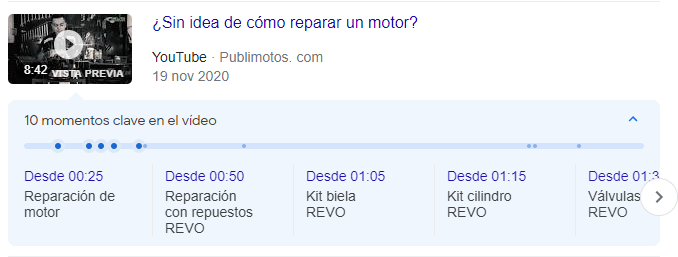
In addition, for certain search results, Google may display key moments in the videos, allowing users to go directly to the section related to their search. This further underscores the importance of properly structuring long-form content.
Experience and Authority: Does E-E-A-T Make Sense on YouTube?
Although we tend to associate concepts such as expertise, authority, and trust with Google SEO, YouTube also uses signals related to the quality and authority of sources.
The platform explains that, to determine the quality of search results, its systems look for signals that help identify channels that demonstrate experience, expertise, and reliability on a particular topic. These considerations take on particular importance in areas where the credibility of information is critical.
For a company, this opens up quite a few possibilities.
A video about internationalization could feature the person who manages international campaigns on a daily basis. Content about marketplaces could include a specialist who works directly with Amazon. An interview could feature an e-commerce manager explaining a real-world project.
We don't need to keep saying over and over again that we're experts. We can demonstrate this through the people, experiences, and examples featured in the content.
We can also reinforce that context clearly stating who is participating, what their background is, and which company they represent and including links in the description to the sources, studies, or tools mentioned in the video.
It's a way to turn YouTube not only into a channel for getting views, but also into a a space where a brand can demonstrate its expertise on topics related to your business.
After publishing: retention, traffic, and results
Publishing the video doesn't mean the work is done. From that point on, YouTube Analytics allows us to understand how the audience responds, where it comes from, and what content is performing best. This data is useful both for optimizing the published video and for making decisions about future videos.
Retention and Traffic Sources
One of the first indicators we can analyze is the audience retention. YouTube Analytics lets you identify peaks and dips throughout the video: if you notice that users drop off during a corporate introduction that’s too long or skip ahead directly to a demonstration, you’ll have pretty clear clues about which parts really interest them.
It's also important to understand where the views come from. YouTube isn't just a search engine: Traffic can come from Search, the home page, suggested videos, playlists, Shorts, or external sources. Therefore, limiting the analysis to whether we’ve managed to “rank #1 for a keyword” provides a rather incomplete picture of performance.
One video might perform well in search results, while another might get most of its reach through recommendations. These are different patterns of behavior that you should identify before deciding which content to replicate or how to optimize it.
From Visualizations to Business Results
Visualizations, on their own, don't tell us much. It's best to analyze them along with impressions, CTR, traffic sources, search terms, retention, and viewing time, but always keeping in mind what we wanted to achieve with that content.
For a B2B company, for example, 3,000 views from marketing professionals interested in a specific service may be more relevant than 100,000 views from an audience that is unlikely to ever become a customer. We can also analyze Which videos drive traffic to the website, attract new audiences to the brand, or play a role in the customer acquisition process?.
And organic reach doesn't have to stand alone. When you want to accelerate the reach of a launch, reach specific audiences, or use video as a lead-generation tool, the YouTube advertising campaigns can complement the visibility achieved through content.
The goal isn't simply to rack up views, but to get the right content reaches a relevant audience and contributes to the company's goals.
YouTube SEO and Google SEO shouldn't be handled separately
A video can have a life beyond YouTube.
Google displays videos and video carousels for certain searches, while A website can use that same content to enhance articles, guides, success stories, or service pages.
That's why, when a company has video, a blog, a podcast, and in-house specialists, it makes sense to develop a comprehensive content strategy.
A research project can become an article. An interview can become a YouTube episode. A particularly interesting response can become a clip. And these different types of content can help each other gain visibility and establish authority on a topic.
This approach is particularly interesting when a SEO agency Develop your search strategy by taking into account not only the pages you want to rank on Google, but also the formats in which our audience seeks out and consumes information.
YouTube SEO is no longer just a list of fields we have to fill out when uploading a video; it becomes part of something much more interesting: A strategy for turning the knowledge that already exists within the company into content that can be found, consumed, and associated with the brand.