
[kkstarratings]
If the year 2018 was characterized by anything, it was the countless changes undertaken in Google Ads. Beyond the new interface, sites and their exclusions for Display have not been exempt from multiple changes. Here's a fact: this configuration has changed 2 times in the last 6 months. In addition to causing some confusion, this fact has raised countless questions among Google advertisers. How to exclude APPs now? Is there an alternative method? Can't you exclude them all at once? Today we will try to answer these and other questions... ?
Changes in locations for Display Network.
You will remember that wonderful time when we used to use «adsenseformobileapps.com» as exclusion, right? This trick stopped working in the summer of 2018, at which time it saw the light of day the first configuration at campaign level for Display. The options were simple: all you had to do was de-select for mobile and interstitial APP applications on cell phones and tablets.
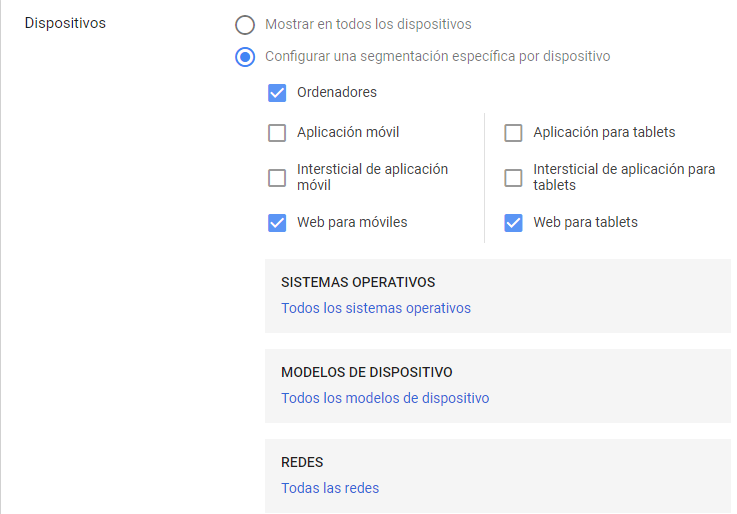
If something is simple, intuitive and works; why change it? Google Ads must not have this same philosophy and just a few weeks ago we saw a new change in this configuration. In the campaign configuration for Display campaigns, the following continue to appear ‘Devices’, although now the APPs are no longer displayed. Instead we see that only allows segmenting by device but does not specify between browsers, interstitial and applications.
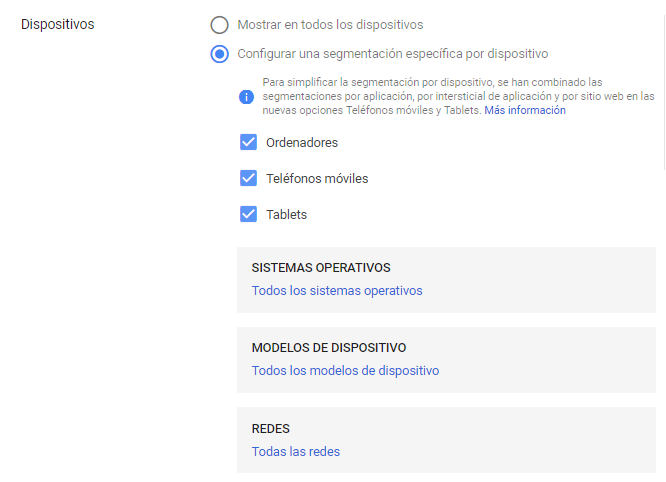
At this point, the question is clear: Is there no human way to exclude APPs in device segmentation? Where do you have to go now to change this setting? ?
Exclusion of APPs in the Google Ads interface.
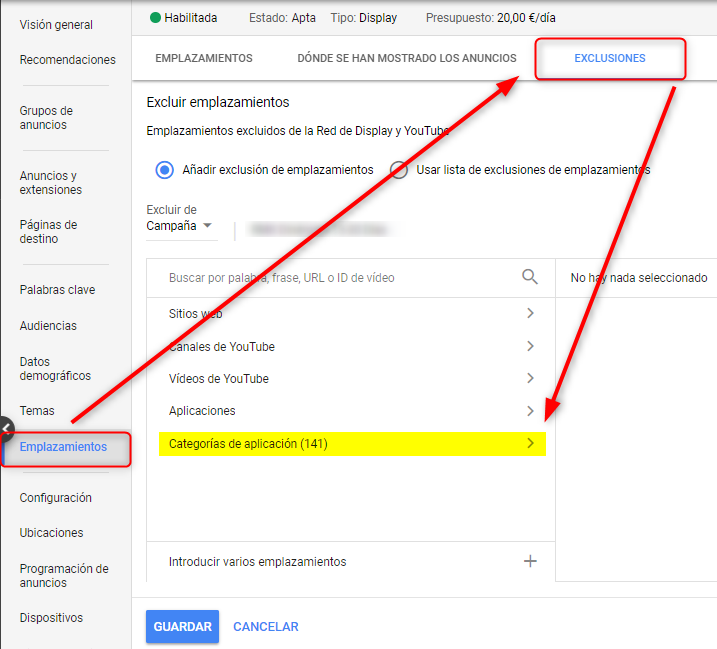
As far as Google Ads is concerned, its interface allows you to exclude PPPs as a site from the campaign settings. However, it has one major disadvantage: does not allow mass exclusion of all APPs, i.e. you will have to make more than 140 clicks to exclude all of them.
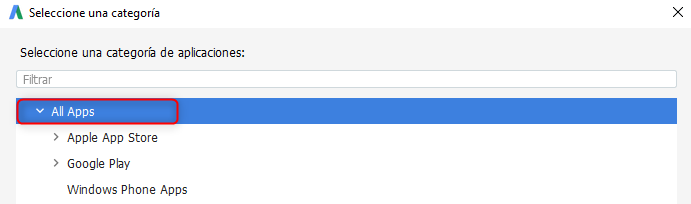
As you can see, the application categories contain 141 options: Apple APP Store, Google Play y Windows Phone APPs. Unless you want to exclude a specific application, this option is the least suitable for mass exclusion.
Exclusion of APPs in Google Ads Editor.
On the other hand, if you need to exclude all APPs at once, Google Ads editor will be your best option. How to do it easily? First of all, select campaign(s) you want to exclude applications from. The editor itself will allow you to select the number of campaigns on which you want to apply such exclusion.
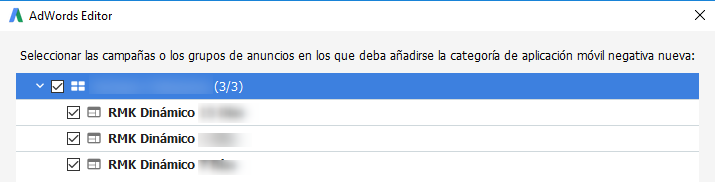
Once you have selected your campaigns, in the menu «Manage» of your editor you will have to deploy the option «Keywords and segmentation». This is where you will need to access the category «Mobile application categories, Negative».» to exclude APPs. By adding a negative mobile application category you will be able to select «All APPs» to exclude all applications at once.
In conclusion, Google Ads Editor is the quickest and easiest way to to exclude all the APPs at once: in 6 steps You can save hundreds of clicks, is there a better way to save time in your daily life? If you need help to exclude PPPs from your campaigns, don't hesitate to contact our team! 🙂

