
Yes you sell on Amazon, you know that every detail counts. And one of the most undervalued, but most powerful, resources are the variants within the same listing.
Grouping different sizes, colors or styles in a single product not only improves the shopping experience, but also increases organic visibility, improves conversion rate, reinforces brand awareness and facilitates the purchase decision.
The variants on Amazon help customers to easily view and compare different options of the same product, to choose the one that best suits what they are looking for. When customers find all the options in a single ad, they buy with more confidence and less friction. And that translates into more sales.
It is also a great advantage for salespeople, as it allows them to group all options on a single product card, concentrating opinions, appraisals and inventory control in one place.
It's not just about adding variants, it's about identifying which variations have the highest demand and best rotation. For that you need data: sales estimates, competitive analysis, actual margins and possible constraints.
As we know that you will have doubts, we leave here several frequently asked questions related to the variants on Amazon, and that every Seller should be clear.
Frequently asked questions about Amazon variants
How many variants does Amazon allow?
Up to 2,000 secondary ASINs (child) for each parent ASIN.
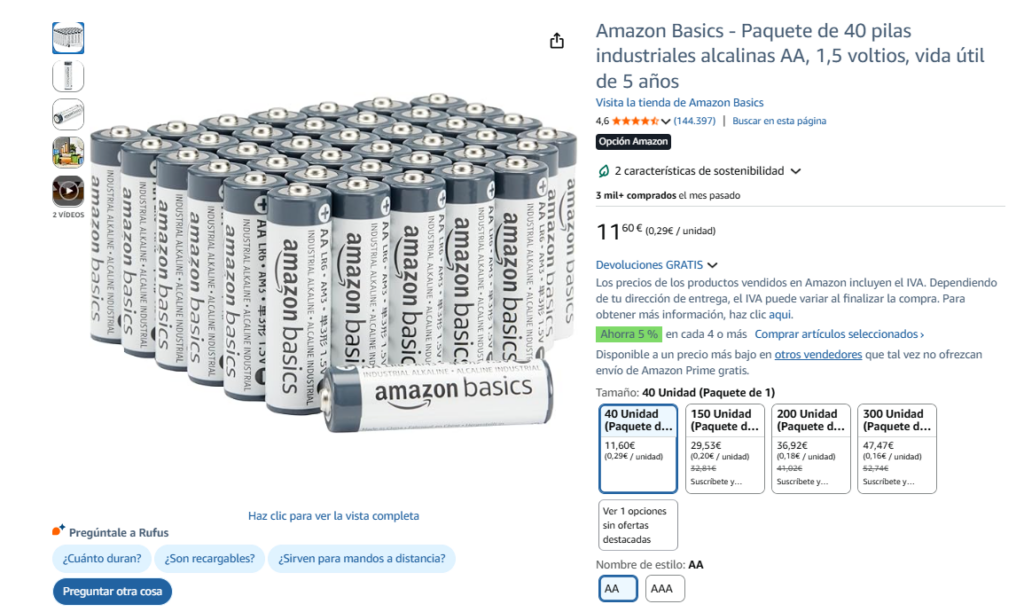
But be careful: more is not always better. The key is a logical and conversion-optimized structure.
Can variants be added to an existing listing?
Yes, Amazon allows you to add variants to an already created listing, provided that the products comply with the established variation requirements.
You can add variants to an existing listing when:
- The products belong to the same type of product.
- Only one allowed variation attribute changes (for example: color or size).
- The products share the same brand and category.
- The relationship between the products has sense for the customer.
Recent changes in variant regulations
Amazon has changed the rules; as of February 12, we will start to encounter several cases of disappearing reviews, product unlinking, etc. Amazon gets picky, and this will mark a turning point for both buyers and sellers.
The review will not be imminent; it will be implemented gradually by category between February 12 and May 31. Ideally, it will be implemented gradually by category between February 12 and May 31.Check if our reviews are well grouped, whether they have consistency between the ASIN parent and most importantly, whether they will add value to the user's purchase decision.
Recommendations for vendors
First, review the variants of your products in “Manage your Inventory” and check that the variation attributes, such as color, size or others allowed by the category, are correctly configured to avoid linking errors.
Then, be sure to that the differences between the variants are minimal and coherent, especially if your goal is to allow them to share reviews; this helps the customer perceive all options as part of the same product and improves buying confidence.
Next, verify that each variant is correctly grouped within the same listing, confirming that the parent-child relationship is well established and that the ASINs are logically associated.
Finally, stay tuned for Amazon emails, They usually give advance notice of changes that may affect your categories or the way variants are displayed, allowing you to anticipate and adjust your listings in time.
Variant types supported by Amazon to unify reviews
- Color or pattern variations: different aesthetic options without changing functionality.
- Size variants: only changes the size, keeping the same function.
- Variants of package size or quantity: different presentations of the same product.
- Secondary aroma variants: aroma variations that do not affect the main function.
- Different model compatibility: products that work with different models of the same type.
How to add a variant in Seller Central?
There are several ways to do this on Amazon Seller Central:
- Editing the existing listing and adding the variants from the variations tab.
- By means of a bulk upload file (flat file) if many products are managed or from the variant configuration wizard.
- Creating a new parent product and associating existing ASINs as children.
Expert advice: ensure that the ratio of variation is consistent; Amazon is very strict about this and, since the end of 2025, as many as 5,000+ variant themes have disappeared, so some may be obsolete and you may not have noticed). Check the file; you may find something like this:
Common mistakes when creating variants on Amazon
SKU without mandatory attributes
One of the most frequent errors occurs when a SKU does not have the mandatory variation attributes defined. This means that the product is trying to be added to a parent-child family, but does not have completed fields such as color, size, style or other allowed attribute.. Without these values, Amazon cannot correctly link the product within the variant matrix.

This problem st usually appears when the SKU was originally created as a stand-alone listing and then an attempt is made to integrate it with the SKU., when it was uploaded via bulk upload and mandatory columns such as variation theme, size_name or color_name are missing, when the variation type of the ASIN parent does not match the attributes of the ASIN child, or when the SKU exists in inventory but was never correctly configured as a variant.
Risks of trying to link different products
If the products are different, e.g. backpack and fanny pack, T-shirt and sweatshirt, thermos bottle and thermos cup, they cannot be linked as variants, even if they belong to the same brand or collection. Try may cause Amazon to block the, If you do not have a family, separate the family or even mark the listing as abuse of variations.
Unification of reviews and category issues
In many cases, the category is locked when the listing is already has a sales history or belongs to a category with restrictions. When this happens, it is not always possible to change it directly from “Edit Listing”.
- One of the most common solutions is to open a case with Seller Support. requesting the category change and providing product information (ASIN, correct category and reason for change).
- It can also be done by means of an inventory file (flat file) to update the item type or product type.
If none of these options work, another alternative is to create a new listing in the correct category and close the previous one, making sure that the product information is consistent to avoid duplication problems.
How to verify that the reviews are correctly unified
If you do not see the reviews unified within a family of variants, The first thing to do is to check that all variants are correctly linked to the same parent ASIN. One of the most common mistakes is that the parent-child relationship is not properly configured; this way, as we have already mentioned above, Amazon can display the reviews separately.
If you have just made the change and you don't see what you want, remind yourself that unification does not show up immediately, Amazon may take some time to update the listing information.
Strategy with existing products and their variants
When to group or split listings
If the variants change only in aspects such as color, size or format, It is best to group them into a single listing with a parent ASIN, as this concentrates the reviews, sales history and relevance of the product.

On the other hand, whether the differences between products are significant in functionality, use or key features, It may be better to keep separate listings, to avoid confusing the customer and improve search relevance.
In general, a good strategy consists of grouping really similar products and separate those that respond to different purchase intentions.
Advanced launch and consolidation strategy
In our experience as a specialized agency, solid research makes the difference between a product that rotates and one that stays in the warehouse. At Geotelecom, we start with a initial strategy, carefully and judiciously considered.
An interesting strategy with existing products is initially launch the variants as separate listings to work on their positioning, generate sales and get reviews independently. In this way, each product can capture traffic for its own keywords, build its performance history and occupy more space within the SERP. This allows you to work on the positioning of each variant and accelerate the generation of sales and reviews, which directly impacts BSR (Best Seller Rank).
Once listings begin to generate traction, they are grouped under a parent ASIN. to consolidate ratings and reinforce the product's authority. In this way, the product is based on several months of work with a very powerful file and a higher sales turnover.
Final tips for making your variants work
Don't try to group different products together just to take advantage of reviews or sales.; Some categories have specific variation restrictions. A bad variant structure can affect positioning or even lead to listing blockages.
Try to avoid these mistakes, organize your product correctly and make your sales take off.


