If you run an online store or lead its digital strategy, you’ve probably logged into Google Analytics looking for a simple piece of data and ended up navigating through a never-ending series of menus and reports. For a long time, the quickest solution has been to exit GA4 and switch to tools like Data Studio.
In this post, we have some good news for you: A few weeks ago, Google launched one of the most anticipated updates for business profiles, reports in dashboard mode.
What Are the New GA4 Dashboards?
These new dashboards are visual and modular dashboards built directly into the platform's interface. The main idea behind this feature is simplicity and query speed.
Unlike standard GA4 reports, these dashboards are based on a highly intuitive modular system:
- Card-based structure: Each metric or chart behaves as a separate block.
- Drag-and-drop interface: You don't need to be an advanced analyst. You can move, sort, and resize the cards however you like to prioritize what really matters.
- Various display formats: You can choose from single-metric cards (for example, total revenue), line charts to view trends, bar charts to compare channels, sortable data tables, and visual conversion funnels.
- Real-time interactive filters: With just a couple of clicks, you can apply global filters (by country, device type, or ad campaign) to the entire dashboard without altering the original settings.
- Quick links in the sidebar: Once you've created and saved the dashboard, you can publish it to the GA4 navigation menu so you can access it from the Standard Reports section.
Step-by-Step: How to Create Your First Custom Dashboard in GA4
Creating a dashboard in GA4 is a simple process that It won't take you more than five minutes if you know exactly which metrics and dimensions you need to review.
A few weeks ago, the only way to create them was through the Library section (at the bottom of the reports). To make them easier to access, there is now a (+) button that lets you go to this new section directly from Reports by clicking on the option Control Panel:
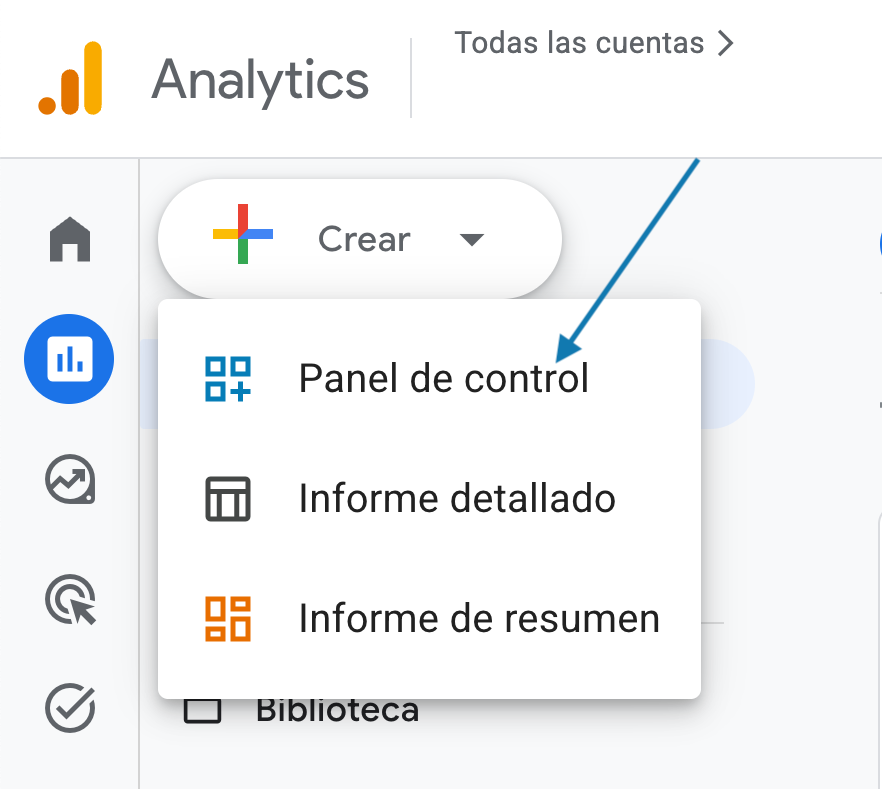
- Select and organize your cards: A blank panel will open with a sidebar containing a library of cards. You can drag and drop the predefined cards provided by Google or create custom cards by selecting the metrics and dimensions you want to cross-reference.
- Adjust the layout: size the main cards so that they occupy the top portion (Key business figures should always be listed at the top) and place the detailed breakdowns at the bottom.
- Save and post: Give your dashboard a clear name and save it. To make it appear in your main menu, edit the corresponding collection in the Library and add your new dashboard to the sidebar.
Limitations of GA4 Dashboards
Although this feature hasn't been available for very long, certain limitations are already apparent. The main one is the inconsistency with the information available in the standard reports. On the other hand, and unlike what happens in the Explore section, The available filters are based on dimensions: You cannot filter by metrics using numerical criteria.
Examples of Interesting Dashboards for E-commerce
Discrepancy between the time of peak traffic and the time of highest purchase value
This dashboard is a perfect example of how Cross-referencing two simple metrics to make tactical business decisions that directly impact the margin. We can see, for example, that Tuesday is the second-busiest day of the week in terms of traffic, but also the second-lowest in terms of average ticket size.
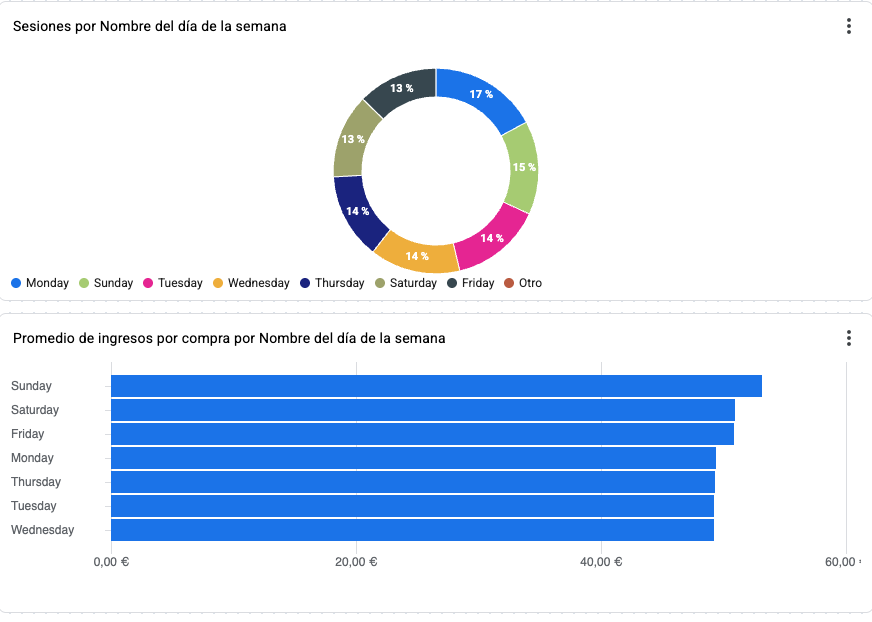
How do you translate this at the level of Adjusting bids and advertising budgets in Google Ads, for example? You can stop spreading the budget evenly throughout the week or concentrating your spending on Mondays just because “there’s more traffic.” With this dashboard, the decision would involve Schedule bid increments on Saturdays and Sundays. Even though there are slightly fewer sessions on Saturday, users who shop over the weekend They fill shopping carts with higher-priced items.
Customer Acquisition vs. Customer Retention with AI: Which Brings You New Customers?
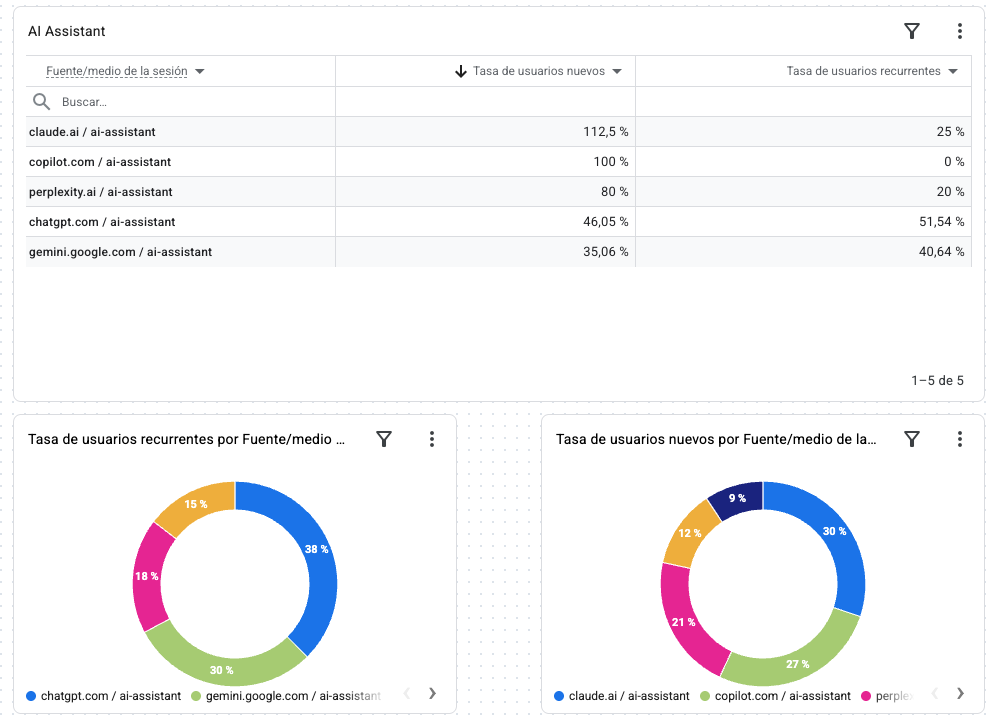
One of the current mistakes is treating artificial intelligence as a single, homogeneous channel. When you cross-reference the AI-Assistant data source with user type (new vs. returning) on a dashboard, the picture changes completely:
- ChatGPT and Gemini serve as customer loyalty channels: They have a huge proportion of repeat users—over 40–50 %. Your regular customers no longer visit your website solely through Google.
- Claude and Perplexity are discovery engines: They report new user rates of over 80 %. These are users who have never visited your e-commerce site before and who arrive based on a direct recommendation from the assistant.
Note: This doesn't mean there's a “magic button” to appear tomorrow on Claude or ChatGPT. What this dashboard does allow you to do is understand Which models are already featuring your brand? naturally and what kind of users they send your way.
From Data Analysis to Decision Making
In short, the true potential of the new GA4 dashboards lies in their ability to Eliminate visual clutter and save time every day. Moving from reviewing isolated static reports to building dashboards focused on specific operational questions allows any user to move from the “What happened?” to “What can we do?”.
Although the functionality still has room for improvement, it represents a crucial step toward to put analytics back at the service of strategy and not the other way around.
Do you have data but struggle to turn it into decisions? At Geotelecom, we help you build a business-oriented analytics.